A front-end for Windows' File Recovery feature
WinfrGUI is a free utility program developed by Aomei for PC. This Windows utility provides users with an alternative way to take advantage of the operating system's built-in file recovery feature. It provides a graphical user interface for the command-line operated function, making it more intuitive to use.
Compared to other solutions like Recuva or Disk Drill Windows Data Recovery, WinfrGUI takes a simpler approach to data recovery. It builds upon the already capable native Windows File Recovery feature and makes it easier to use for more people with its implementation of a UI front-end.
Bypass those terminal commands
Accidentally deleting a file from your computer is always a bad experience, even worse if you somehow permanently delete it from your Recycle Bin. There are plenty of data recovery programs available in the market today being offered by third-party developers to help you get them back. However, what you probably did not know is that Windows has its own built-in utility for this purpose already.
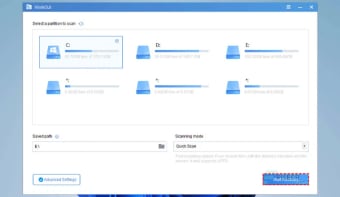
It's called Windows File Recovery and actually comes with a nice feature set. Plus, it's already part of the OS, so it's free. There's a catch, though. Since it's a command-line utility, you'll have to use commands to operate it. Not many users want to deal with this, thus WinfrGUI was developed to make using it a lot easier through a graphical user interface.
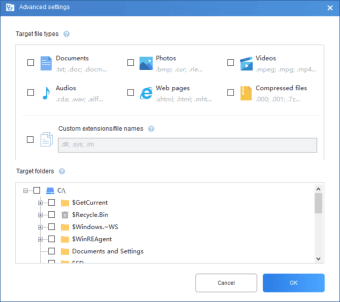
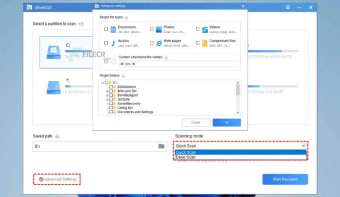
With this program, you can conduct Quick or Deep Scans on your PC for data recovery. It can work on virtually any storage device, be an SSD or a memory card. The same applies to its wide file type support, ranging from media to zipped archives. You can even set preventive measures to avoid accidental deletions again. The only caveat here is it only works on Windows 10 and 11.
Made better
Windows File Recovery is capable but never did get much attention. That can change with the help of WinfrGUI, which improves upon the usability side in major ways. No longer will you have to deal with confusing terminal commands as you now have a GUI to work with. It's fast, easy to use, and offers everything you need for free. Recommended.